
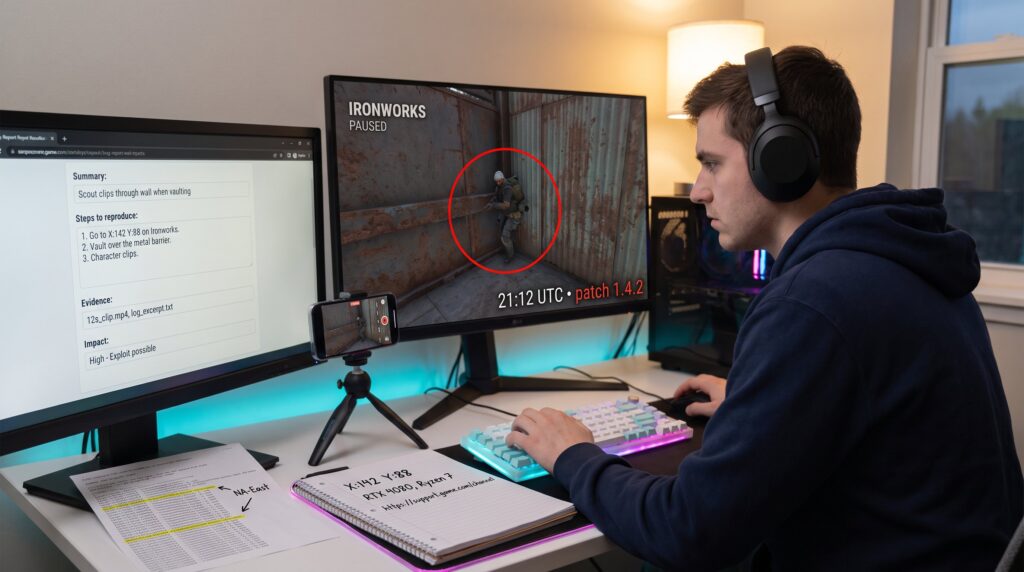
How Players Can Give Developers Useful Feedback starts here with one simple truth: specific reports let teams fix problems faster. In 2026, games ship faster and live services evolve daily, so players’ observations are often the earliest warning system. This guide shows gamers how to observe, record, and report issues so developers can act. It focuses on concrete steps, what to capture, how to describe it, and where to send it, so feedback moves from complaint to productive change.
Key Takeaways
- Specific and detailed player feedback helps developers fix issues faster by reducing investigation time and guesswork.
- Include precise observations like timestamps, game version, map, and reproduction steps to make feedback actionable and clear.
- Use a structured format—summary, reproduction steps, expected vs actual results, evidence, and impact—to ensure developers understand and prioritize reports.
- Choose the correct official channels and maintain respectful, concise communication to increase the chance of developer response.
- Providing solid evidence such as video clips, logs, and system specs transforms vague complaints into productive feedback that strengthens games and communities.
Why Thoughtful Player Feedback Matters (For Games, Devs, And The Community)
Thoughtful player feedback speeds fixes and improves game balance. When a player reports an exploitable bug with a timestamp and reproduction steps, developers can triage it in hours rather than days. That matters because modern development teams juggle hundreds of reports per week and limited reproduction time.
Concrete example: a multiplayer studio resolved a desync that lost matches after three player reports that included clips and server logs. Each report reduced investigation time by showing consistent conditions: map, character, and server region. That level of detail cuts developer guesswork and reduces hotfix cycles.
Players also shape balance and UX. Balanced weapon or progression feedback that uses match data, win rates, or repeatable examples becomes actionable. Reporters who distinguish between a bug (crash, desync) and a balance concern (weapon feels overpowered) increase the chance the team treats the item correctly.
Community benefits too. Clear reports build trust: fixes arrive faster, patch notes become more accurate, and discussion stays focused. For players unsure where to start, UNF Gaming publishes resources that explain reporting basics and community pathways in more depth. The site’s overview helps players find the right channel and tone for their report and connects hobbyists with reporting templates.
Why this matters today: live games rely on community telemetry and reports to spot regressions, and thoughtful players who provide evidence are the most useful partners a team can have.
How To Observe, Reproduce, And Collect Useful Evidence
Start with the fact: evidence separates a vague complaint from a fixable ticket. A good report includes screenshots, a short video clip, system specs, and crash logs when relevant.
Observe precisely. Note the exact time, game version, map, mode, character, and server region. If the problem happened during a ranked match at 21:12 UTC on patch 1.4.2, record that. That timestamp can be cross-checked against server logs.
Reproduce systematically. Attempt the same sequence three times and record whether the issue is consistent or intermittent. Log the starting conditions: character loadout, equipped attachments, saved game, and whether any mods or overlays were active.
Collect technical evidence. Use built-in recording or a phone camera for clips. Export crash dumps or include the game’s log file. On PC, note GPU/CPU model and driver version: on console, include firmware version. If saving files or replays helps, attach those files.
Short, specific examples stick: “On Arena map ‘Ironworks’, while using Hunter class, pressing ‘X’ after sprint causes a teleport 4/5 tries” is far stronger than “game teleports me sometimes.” This is covered in more depth in the overview guide.
Players who follow this method raise the signal-to-noise ratio for dev teams and trigger faster, more accurate responses.
How To Structure Clear, Actionable Feedback Developers Can Use
Start with the conclusion: structure makes action possible. Developers scan tickets quickly: a concise format saves time and prevents misclassification.
Use this template: Summary, Steps to reproduce, Expected result, Actual result, Evidence, and Impact. Keep each section short and factual.
Summary (one line): “Player model clips through wall when vaulting on ‘Ridge’.”
Steps to reproduce (numbered): 1) Load Solo mode on Ridge: 2) Equip Scout: 3) Sprint, then vault over low wall at X:142 Y:88: 4) Observe clip. Precise coordinates, button names, and starting state matter.
Expected result vs Actual result: “Expected: Scout clears wall. Actual: Scout becomes invisible for 2–3 seconds and collides with physics.” This helps developers know what fix to aim for.
Evidence: attach 12s video clip, game log, and save file. When logs are large, highlight the timestamp or paste the 5–10 relevant lines.
Impact on gameplay: indicate severity and scale, does it block progression, cause lost rewards, or simply look odd? “Blocks quest completion for ~15% of attempts” is more useful than “annoying.”
Keep reports single-issue. If a session shows both a crash and a balance problem, file two tickets. Actionable feedback is specific, measurable, and focused on one issue at a time. Players who follow this structure make it easier for engineers and designers to reproduce, prioritize, and resolve problems quickly.
Best Channels And Etiquette For Communicating With Development Teams
Fact first: choose the channel developers monitor and follow their rules. Official bug forms, support tickets, and tagged forum threads get routed: public complaints on social media rarely do.
Use the right channel. For urgent crashes or account issues, file a support ticket. For reproducible bugs or balance feedback, use the game’s official bug report form or pinned thread. Many studios also monitor Discord channels and in-game reporting tools during early access and stress tests.
Respect etiquette. Stay respectful, concise, and avoid duplicate posts. If a template exists, use it. Developers often ignore reports that are rude, contain irrelevant rants, or flood the same thread multiple times.
Provide follow-ups when asked. If a developer requests logs or a video, respond promptly and keep messages organized. That cooperation shortens the time from report to fix.
Community resources speed learning. Players can compare reporting approaches using community guides and reporting templates. UNF Gaming maintains practical resources and player pathways that show where to file each type of feedback and how to phrase it to get a response. For players learning to report, that short guide offers examples and etiquette tips.
When to escalate: if a problem causes data loss or repeated account issues and the normal channel stalls, escalate through support escalation paths or the studio’s published contact points. Always keep records of ticket numbers and timestamps.
Conclusion
Clear, evidence-backed reports change games faster than vague complaints. Players who observe carefully, reproduce reliably, and format reports clearly become trusted partners. That trust leads to better balance, fewer crashes, and stronger communities. When players learn reporting craft, they help everyone, devs, streamers, and fellow gamers, enjoy better, more stable play.