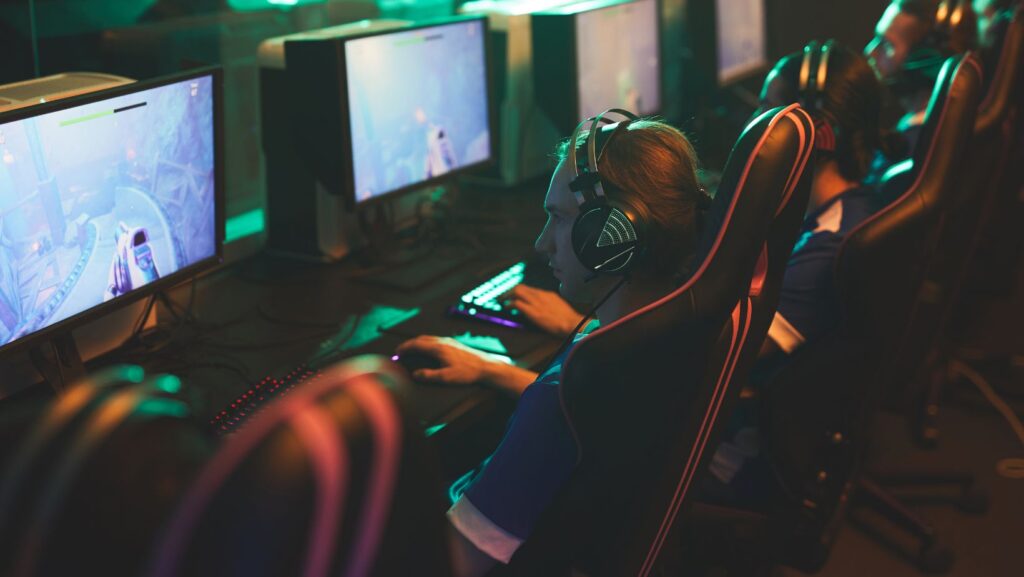
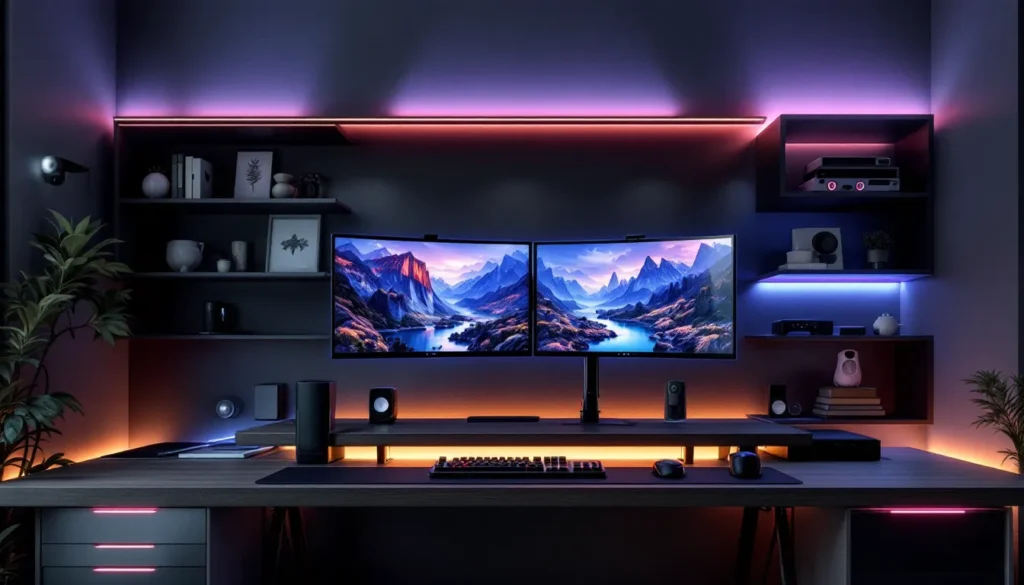
Your gaming background isn’t just decoration, it’s the stage where countless hours of gameplay happen, where streams go live, and where your competitive edge is born. Whether you’re a casual player who streams on the side, an esports competitor fine-tuning every detail, or someone building their first serious setup, the environment behind and around you shapes both performance and presentation. A thoughtfully designed gaming setup background enhances immersion, improves focus, and creates the visual identity that defines your space. In 2026, with streaming culture at an all-time high and gaming setups becoming increasingly aspirational, understanding how to design, organize, and optimize your background is essential. This guide breaks down everything from budget-friendly options to premium installations, DIY projects, and real-world inspiration across PC, console, and mobile gaming platforms.
Key Takeaways
- A gaming setup background directly impacts focus, mental state, and content credibility—making intentional design essential for both competitive players and streamers.
- Cable management and proper lighting are the two highest-impact, budget-friendly upgrades that transform any gaming setup background from cluttered to polished.
- Modern gaming backgrounds favor timeless structure over trendy elements, with successful setups using minimalist foundations paired with personalized accents that reflect individual gaming preferences.
- Streaming performance depends on understanding camera angles and lighting; a background that looks impressive in person may appear dark, cluttered, or unflattering on camera without proper planning.
- Budget-friendly options like paint ($10–20), DIY floating shelves ($20–50), and basic LED strips ($15–30) deliver comparable visual impact to premium installations when executed strategically.
- The most successful gaming setup backgrounds balance negative space with personality, avoiding overcrowding while maintaining visual interest that supports long gaming sessions without eye strain or distraction.
What Is a Gaming Setup Background and Why It Matters
A gaming setup background encompasses the physical space directly behind your monitor(s), desk, or seating area, everything visible in your immediate gaming environment. This includes walls, shelving, lighting, posters, panels, cable management systems, and any decorative or functional elements that fill the visual space around your gaming rig.
Why does it matter? Three reasons stand out. First, it affects your mental state: a cluttered, chaotic background creates cognitive load and distracts from gameplay. A clean, intentional background reduces visual noise and helps you focus on what’s happening on-screen. Second, if you stream or create content, your background is part of your brand. Viewers form impressions within seconds, a professional, polished background builds credibility, while a messy one undermines it regardless of your skill level. Third, your setup background influences the overall aesthetic and functionality of your gaming space, making it feel either like a thoughtfully curated environment or just a corner with a desk shoved in it.
The gaming setup background has evolved from overlooked afterthought to a central component of the overall gaming experience. It’s not frivolous, it’s part of how modern gamers and streamers present themselves and optimize their gameplay environment.
The Evolution of Gaming Backgrounds Over Time
Not long ago, gaming backgrounds were simple: bare drywall, maybe a poster or two, cable mess everywhere. The setup existed purely for function. By the early 2010s, as streaming platforms like Twitch emerged, backgrounds suddenly mattered. Streamers realized that viewers weren’t just watching gameplay, they were watching them, and their environment became part of the content.
The mid-2010s saw the rise of RGB lighting as a status symbol. LED strips, keyboard backlighting, and ambient lighting became the visual shorthand for “serious gamer.” It was flashy, new, and defined an era. Around 2018-2020, minimalism started gaining traction as a counterpoint: clean lines, neutral colors, and deliberate negative space became just as prestigious as RGB overload.
By 2023-2025, the trend shifted toward authenticity and personalization. Gamers stopped trying to match a single aesthetic template and started building backgrounds that reflected their actual interests, vintage arcade machines, gaming art, shelves of collectibles, nature elements, or a mix of everything. The pressure to look “professional” eased, and “genuine” became the new benchmark.
In 2026, we’re seeing three simultaneous trends: ultra-minimalist streaming setups (especially among competitive FPS players who want zero distractions), immersive themed environments (complete with ambiance and narrative), and hybrid approaches that blend function with personality. The evolution reflects a broader acceptance that gaming setups are personal, there’s no single “right way” to design a background anymore.
Popular Gaming Setup Background Styles and Aesthetics
Minimalist and Modern Designs
Minimalism in gaming backgrounds means clean walls (often white, black, or soft gray), a single accent wall or panel, and zero visual clutter. Cable management is hidden or routed cleanly. The focus is entirely on the monitor and the game. This style dominates competitive gaming, streamers playing tactical shooters like CS2 or Valorant often use minimalist setups because every visual distraction matters at the pro level.
The appeal is psychological: less to process means sharper focus. Minimalist backgrounds also photograph and stream well, they look professional, intentional, and timeless. They’re easier to maintain and update without a complete overhaul. A well-executed minimalist setup is quietly elegant, not boring.
Dark and Atmospheric Themes
Dark backgrounds, deep blacks, charcoals, and dark blues, create an immersive, cinematic feel. Often paired with subtle RGB backlighting or bias lighting (LEDs behind the monitor), this style makes the screen feel like a window into another world. It’s especially popular in story-driven or horror gaming, where atmosphere matters as much as gameplay.
Dark themes reduce eye strain during long sessions (though actual monitor settings matter more than wall color) and create a cocoon-like environment that deepens immersion. They also hide dust and wear better than light backgrounds. The downside: they can feel cave-like if not balanced with proper lighting, and they require intentional accent lighting to avoid looking completely black on stream.
RGB Lighting and Tech-Forward Backgrounds
RGB isn’t dead, it’s just matured. Modern tech-forward backgrounds feature color-changing LED strips, accent lighting, and sometimes programmable panels that sync with gameplay or stream alerts. This style celebrates the tech aspect of gaming, making the setup itself part of the appeal.
RGB backgrounds work best when restrained: accent lighting on shelves or behind monitors, not a full rainbow explosion. The most impressive setups use color theory, complementary colors, consistent saturation, and purposeful brightness, rather than cycling through every possible hue. This style demands more planning and investment but creates instantly recognizable, shareable content.
Nature and Organic Backgrounds
Live plants, nature photography, wood textures, and earth tones are gaining serious traction. These backgrounds create a biophilic effect: they reduce stress and improve focus by bringing natural elements into an indoor space. Some gamers incorporate moss walls, wood paneling, or large-scale nature photography.
This style works especially well for longer gaming sessions or cozy/relaxing game genres. It’s less common in competitive FPS setups but increasingly popular in strategy, RPG, and indie game communities. The downside: live plants require maintenance, and nature photography can look generic if not carefully curated.
Choosing the Right Background for Your Gaming Setup
Space and Layout Considerations
Your gaming setup background must work within your physical constraints. A tiny bedroom demands a different approach than a dedicated gaming room. Measure the wall space behind your setup, this determines whether you can accommodate a full backdrop, a single accent wall, or just shelving and small decorative pieces.
Consider desk depth too: if your desk is close to the wall, a background that extends high makes the space feel cramped. If you have breathing room, you can go bolder. Also think about sightlines, what’s visible on camera during streams? A background that looks good in person might have awkward angles, cables, or clutter that appear on-camera.
Layout also means deciding what goes into the background. Will you have shelves for gaming collectibles? Monitor arms that float away from the wall? RGB strips running along the baseboards? These decisions compound, so plan the full layout before buying individual elements.
Lighting and Ambiance Impact
Lighting is the single most underrated factor in gaming backgrounds. Good lighting transforms a boring setup into an atmospheric one. You’ll need three types: task lighting (functional, for seeing your keyboard and desk), accent lighting (highlights the background itself), and bias lighting (behind the monitor, reduces eye strain and adds depth).
For streaming, proper lighting prevents your background from disappearing into darkness or appearing blown-out on camera. A softbox or ring light pointed at you (not your background) controls your face: separate accent lights on the background add visual interest without creating glare on monitors.
Color temperature matters: warm light (2700K) creates a cozy, relaxing vibe: cool light (5000K+) feels more energizing and tech-forward. Many gamers use adjustable lighting systems like Nanoleaf or LIFX to switch between color temperatures and themes without rewiring everything.
Streaming and Content Creation Needs
If you stream or create content, your background serves a dual purpose: it’s both your gaming environment and your set design. This changes priorities significantly. A background that looks incredible in person might photograph poorly, too dark, too bright, or visually confusing.
For streaming, consider: camera height and angle (does the background fill the frame properly?), color contrast (does your background help you “pop” visually, or blend into it?), and whether elements distract from gameplay. Many competitive streamers use solid color backgrounds or simple panels specifically because they don’t compete with on-screen action.
Content creators should also think about consistency, if your background is radically different every week, it becomes harder for viewers to recognize your space. Invest in a cohesive look that you can maintain and subtly update over time without complete overhauls.
Budget-Friendly Gaming Background Ideas
You don’t need thousands of dollars to build an impressive gaming setup background. Smart choices at the budget level can rival expensive setups.
Paint and Wall Color: The cheapest major change is repainting your wall. A can of paint ($10–20) and a couple hours of work transform the entire vibe. Choose a color that complements your other gear, matte black is forgiving and looks professional, while soft gray or navy create depth. Avoid bright colors unless you’re committed to matching decor around them.
DIY Floating Shelves: Wooden shelves from hardware stores ($20–50 per shelf) mounted on simple brackets create display space for gaming collectibles, figures, or books without taking up desk real estate. They break up plain walls and add texture.
String Lights and Affordable LED Strips: Basic LED strips from Amazon ($15–30) create ambient lighting without the premium price of Nanoleaf. They won’t sync with game events, but warm white or soft RGB strips add polish cheaply. Fairy lights or cafe-style string lights ($10–25) create a cozy vibe.
Posters and Prints: Gaming art prints ($5–20 each) frame the background without permanent changes. Choose artwork that reflects your favorite games or aesthetic. Mix framed and unframed prints for visual interest, and rotate them seasonally to keep things fresh.
Cable Management Basics: This costs almost nothing but looks expensive when done right. Cable ties, clips, and conduit from a hardware store ($10–20 total) keep cords organized and invisible. Organized cables don’t just look better, they make your entire setup feel more intentional.
Pegboards and Wall Organizers: A pegboard ($20–40) with hooks lets you hang controllers, headsets, and cables off the wall while keeping them accessible. It’s functional and visually interesting.
Natural Elements: A few potted plants ($10–40 depending on size) instantly add life to a gaming background. You don’t need a full moss wall, even one or two well-placed plants create a softer, more human space.
Premium and High-End Background Options
High-end gaming backgrounds leverage professional materials, custom installations, and premium lighting systems to create setups that stand out on streams and in person.
Acoustic Panels and Professional Soundproofing: Beyond aesthetics, acoustic panels ($300–$1500+ depending on coverage) treat echo and improve sound quality, critical for streamers. Brands like GIK Acoustics or Primacoustic make panels in various colors and designs that look intentional rather than purely functional.
Custom 3D Wall Panels: Textured wall panels (like those from WallArt or 3D Wall Stickers companies, $500–$2000+) add dimension and sophistication. They catch light differently than flat walls, creating visual depth without taking up floor space. They’re modular, so you can build them to fit your exact wall dimensions.
Professional RGB and Smart Lighting Systems: Nanoleaf ($300–$1000+ depending on coverage), Corsair iCUE lighting ecosystems, or Elgato Stream Deck with lighting integration create programmable, game-reactive backgrounds. These sync with gameplay, stream alerts, or music, transforming your background in real time.
Custom Backdrop and Frame Systems: Professional photographers use backdrop systems: gamers are adopting the same approach. Mounting rails ($200–$500) let you swap backgrounds instantly. Pair with printed or fabric backdrops ($100–$500 each) for themed looks.
High-End Shelving and Display Cabinets: Custom-built shelving, glass display cases, or modular furniture systems ($500–$3000+) create curated spaces for gaming memorabilia, collectibles, and gear. These aren’t just storage, they’re showcases.
Themed Environment Installations: Serious enthusiasts build complete themed environments: arcade cabinet corners, vintage gaming museums, or hyper-modern tech spaces. These can range from $2000 to $10,000+, depending on scope, but they’re truly one-of-a-kind.
Premium backgrounds require longer planning but deliver results that feel genuinely special. The key is avoiding the trap of spending big money on trendy elements that feel dated in a year. Invest in timeless structure and tasteful accents.
DIY Gaming Background Projects and Customization
Backdrop and Panel Solutions
Building your own backdrop or accent panels is cheaper than buying pre-made and lets you customize every detail. The simplest approach is fabric draping: buy a large piece of black fabric ($20–50) from a craft store, mount it on PVC pipe frames or directly on wall hooks, and adjust the way it falls. This creates a professional-looking background that diffuses light evenly for streaming.
For something more permanent, build a frame from 1×2 wood studs ($40–100), cover it with fabric or paint it, and mount it behind your desk. Add LED strips to the edges for accent lighting. This takes a weekend and basic tools but looks professional.
Another option: acoustic foam tiles, often used for soundproofing, are available in various shapes and colors. Arrange them on your wall in patterns ($100–300 for full coverage) to create texture and visual interest while improving acoustics as a bonus.
Paint and Wall Treatment Ideas
Paint is the most affordable way to completely change your background. Beyond solid colors, consider:
Accent Walls: Paint one wall behind your desk a contrasting color while keeping others neutral. This frames your setup and draws attention without overwhelming the space.
Color Blocking: Paint two-tone or three-tone horizontal or vertical sections. Matte black on the bottom, gray on top creates a professional tier effect. This technique is easier than you’d think and looks surprisingly polished.
Textured Paint: Specialty textured paints ($30–60 per can) create depth and hide imperfections. A matte or satin finish looks more intentional than glossy, which can feel industrial.
Chalkboard or Whiteboard Paint: Functional and fun, use it to display gaming quotes, your stream schedule, or just doodles. It breaks up plain walls and gives you an interactive element.
Stencil Work: DIY stencils (buy or make them, $10–30) let you add patterns or gaming-themed designs without freehand painting skills. Stencil a repeating geometric pattern, gaming console icons, or pixel-art designs.
Paint projects require minimal investment and are completely reversible if your taste changes. That’s their superpower, experiment cheaply before committing to more expensive elements.
Cable Management and Background Organization
Cable management is unglamorous but absolutely essential. Visible cables instantly read as “messy” no matter how polished everything else is. They also create physical hazards and make troubleshooting harder.
Basic Strategies: Use cable ties, velcro wraps, or clips to bundle cables together. Route them behind furniture or along wall edges where they’re hidden from camera angles. Label cables at both ends so you know what’s what when you need to unplug something.
For a cleaner look, invest in cable conduit or spiral wrapping ($15–30) that hides cable bundles while keeping them organized. Paint it to match your wall color for invisibility.
Built-in Solutions: If you’re planning a semi-permanent setup, consider running cables through wall conduit (requires drilling but hides everything) or using desk grommets and routing management systems. Cable trays mounted under desks ($30–80) keep everything beneath the visible surface.
Power Management: Use power strips or a cable management box ($20–50) to consolidate plugs. Position it out of sight or behind furniture. This also makes it easy to kill power to your entire setup at once.
Monitor Arm Cables: Monitor arms reduce cable visibility by suspending the monitor away from the wall. The arm itself can hide some cables, and the freed-up desk space means fewer visual distractions. A good dual monitor arm runs $100–300 but pays dividends in a cleaner background.
Wireless Options: Where possible, go wireless: wireless mice, headsets, and controllers eliminate cable clutter. The initial investment is higher, but the visual and functional payoff is real.
The best cable management system is one you’ll actually use. Don’t over-engineer it, start simple and adjust as needed. A background with five visible cables is messy: the same setup with cables routed cleanly looks intentional and expensive, even if you spent nothing extra.
Common Mistakes to Avoid When Setting Up Your Gaming Background
Going Too Trendy: RGB everything might look cool now, but trends shift fast. Avoid building a background entirely around a specific trend (neon aesthetics, maximalist clutter, etc.) unless you’re comfortable updating it yearly. Invest in timeless structure and add trendy elements as accents.
Ignoring Camera Angles: If you stream or create content, sit in your chair and look at what the camera actually sees. Many gamers build a background that looks great in person but terrible on stream, too dark, too cluttered, or with awkward angles. Film yourself before finalizing.
Underestimating Lighting: A great background looks terrible in bad lighting. Don’t skimp on accent lighting or bias lighting. It’s not optional, it’s foundational. Even $50 in decent LED strips transforms a space.
Overcrowding: Empty space isn’t wasted space. Negative space makes other elements pop and keeps a background from feeling claustrophobic. You don’t need to fill every inch of wall.
Poor Cable Management: This is the #1 thing that undermines an otherwise great setup. No amount of nice wall treatment matters if cables are tangled everywhere. Prioritize this early.
Mismatching Aesthetics: Mixing three completely different styles (industrial, minimalist, and cottagecore, for example) without intentionality looks confused. Pick a direction and stay consistent. If you want eclecticism, it has to feel curated, not random.
Ignoring Ventilation: Don’t block airflow around your PC, monitors, or other hardware with panels or walls positioned too close. Overheating is a real risk if your background setup traps heat.
Not Planning for Updates: Build your background with the assumption you’ll want to change it in 6–12 months. Use removable elements where possible (removable wallpaper instead of paint, modular shelving instead of built-ins) so updates don’t require a complete overhaul.
Forgetting About Maintenance: Complex backgrounds with lots of elements collect dust and require regular cleaning. A background with too many textured surfaces or tight spaces becomes a chore to maintain. Simple beats high-maintenance every time.
Inspiring Gaming Setup Backgrounds Across Different Platforms
PC Gaming Setups
PC gamers often push hardest on background aesthetics because PC setups usually involve more screen real estate and multiple monitors. The most celebrated PC backgrounds balance minimalism with personality.
Competitive FPS players (CS2, Valorant, Apex) tend toward minimal: black walls, clean cable management, single accent monitor, maybe a single LED strip. The focus is ruthlessly on gameplay. These setups stream well because there’s nothing to distract from what’s happening on-screen.
Other PC gamers, strategy, RPG, or content creators, embrace richer backgrounds. A well-mounted dual-monitor arm with RGB backlighting, shelves displaying gaming art or collectibles, and ambient lighting creates an immersive workspace that looks incredible on stream. An Ultimate Gaming PC Desk Guide can help you structure the foundation.
PC setups also accommodate more complex cable management and custom installations. Many serious PC gamers build complete themed environments, cyberpunk aesthetics with neon accents, vintage gaming rooms with retro hardware displays, or minimalist studios with architectural lighting. The modularity of PC setups makes this easier than console or mobile spaces.
Console Gaming Spaces
Console gamers (PlayStation, Xbox, Nintendo) often have less setup flexibility, the console, TV, and controllers are the core components. Backgrounds tend to be simpler: couches or gaming chairs, often in living rooms rather than dedicated desks.
Console backgrounds that stand out usually emphasize the TV itself: wall-mounting with hidden cables, accent lighting behind the TV, and shelves for game cases or collector’s editions. An Ultimate Guide to the Best PC Gaming Desk addresses desk-based setups, but console gamers sometimes benefit from adjacent furniture arrangements.
Some console gamers create arcade-style setups with vintage cabinets, LED signage, or themed seating areas. These are inherently aspirational but achievable with planning. Console streaming setups need special attention to camera angles since the player sits further from the console than a PC gamer sits from their monitors.
Mobile and Portable Gaming Environments
Mobile and handheld gaming (Switch, Steam Deck, mobile phones) creates a different dynamic, the background is often wherever you’re sitting, not a dedicated wall or desk setup. But, streamers and content creators of mobile games still need intentional backgrounds.
Popular approaches include gaming lounge setups (comfortable seating with good lighting, shelves of handhelds on display), minimalist desk setups with the handheld mounted or displayed prominently, or outdoor/cafe setups that emphasize portability. Mobile gamers often showcase their device and environment more equally than PC or console gamers.
Retro handheld collectors sometimes build dedicated display walls featuring Game Boys, Nintendo DS units, or other vintage handhelds, turning their gaming background into a museum-like showcase. A guide to creating a stellar retro gaming setup offers specific ideas here.
Conclusion
Your gaming setup background is more than decoration, it’s the foundation of how you present your gaming identity, whether to yourself during immersive long sessions or to audiences on stream. The choices range from nearly free (paint and cable management) to significant investments (professional lighting and custom installations), but the fundamentals remain consistent: intention, organization, and alignment with your actual needs.
The best gaming backgrounds avoid trends in favor of timeless structure with flexible accent elements. They prioritize cable management and lighting because those elevate everything else. They respect sightlines and camera angles. They balance personality with function, refusing the false choice between “sterile and professional” and “cluttered and authentic.”
Start with your space constraints, identify your primary use case (competitive gaming, content creation, immersive play, or a combination), and build from there. Most of the impact comes from the first 20% of effort: paint, cable management, and basic ambient lighting. Premium elements add refinement but aren’t prerequisites.
Gaming backgrounds continue evolving in 2026, but the core principle hasn’t changed: the best setup is the one that helps you focus, perform, and enjoy gaming. Everything else is in service of that.