
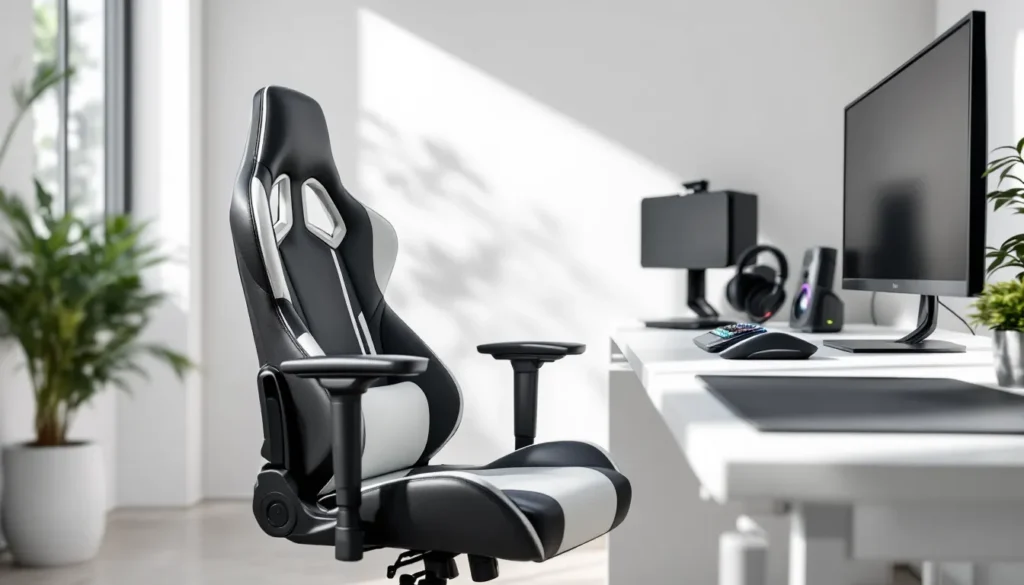
A black and white gaming chair isn’t just furniture, it’s the anchor of your entire setup. Whether you’re grinding ranked matches, streaming for hours, or diving into single-player campaigns, your chair directly impacts comfort, posture, and how long you can perform at your peak. The color combination has become iconic in gaming culture, offering that clean, professional aesthetic that works in any room while keeping the focus on performance where it matters. This 2026 guide breaks down exactly what separates a solid black and white gaming chair from a regrettable purchase, covering features that actually impact gameplay and comfort, price points across the spectrum, and the mistakes most gamers make when shopping.
Key Takeaways
- Black and white gaming chairs combine timeless aesthetic neutrality with function-first design, making them ideal for any room setup and compatible with sponsorship branding or RGB peripherals.
- Ergonomic features like adjustable lumbar support, proper seat depth, and neck support are essential to prevent back pain and maintain performance during extended gaming sessions.
- Mid-range black and white gaming chairs ($300–$700) offer the best value for serious gamers, with full lumbar adjustment, hybrid upholstery, and durability lasting 5–7 years.
- Prioritize adjustability and build quality over aesthetics—fixed armrests or poor recline mechanisms will cause discomfort within months, regardless of how good your chair looks initially.
- Regular maintenance including weekly dusting, monthly deep cleaning, and annual frame inspections will extend your black and white gaming chair’s lifespan and prevent mechanical failures.
- Avoid common mistakes like ignoring your actual body dimensions, buying the cheapest budget option, and overlooking recline mechanism durability, which collapses first in low-quality chairs.
Why Black And White Gaming Chairs Are A Top Choice For Gamers
Aesthetic Appeal And Room Compatibility
The black and white color scheme dominates gaming setups for a reason. It’s not trendy, it’s timeless. Unlike aggressive reds, blues, or RGB-heavy designs, black and white serves as a neutral backdrop that complements any monitor setup, lighting, or desk configuration. A white gaming chair with black accents can brighten a dim gaming space without being distracting, while the inverse works equally well in modern minimalist rooms. This versatility means you’re not locked into a specific aesthetic vision: the chair adapts to your room as your setup evolves.
From an equipment perspective, this neutrality is huge. Esports teams, streamers, and content creators often adopt black and white setups precisely because the gear doesn’t clash with sponsorship branding or RGB peripherals. The chair becomes invisible in the background while you’re the focus, critical if you’re streaming or recording content.
Performance Features That Matter
Black and white gaming chairs aren’t chosen just for looks. The manufacturers targeting this color scheme tend to focus on function-first designs. You’re looking at premium materials, reinforced frames, and adjustable features that serious gamers actually need. Many black and white models skip the flashy aesthetic gimmicks and pour those savings into build quality, lumbar support, and long-term durability.
The best black and white gaming chairs offer adjustable lumbar support, reclining mechanisms that don’t feel cheap, and armrests that don’t wobble after six months. Unlike chairs that sacrifice structure for RGB lighting or aggressive styling, you’re getting engineering focused on preventing back pain during 8-hour sessions and maintaining stability during competitive gameplay.
Key Features To Look For In A Black And White Gaming Chair
Ergonomic Support And Comfort
Ergo support isn’t optional if you’re spending more than a few hours a day in your chair. The spine has natural curves, and a proper gaming chair supports those curves instead of forcing you into an unnatural position. Look for chairs with adjustable lumbar support, not a fixed pillow tacked on, but actual lumbar adjustment that lets you dial in the exact support your back needs.
Neck and shoulder support matters too, especially if you’re tall or have existing neck issues. A high backrest with padding at the top prevents that forward-slouch posture that leads to neck pain after marathonsessions. The best black and white gaming chairs include a removable headrest pillow that you can position correctly or toss if it doesn’t suit your proportions.
Seat depth is critical but often overlooked. Your thighs should be fully supported without the edge of the seat digging into the back of your knees. Seat height adjustability is table stakes, you need to adjust the chair so your feet are flat on the ground and your elbows align with your desk. This isn’t a luxury: it’s foundational ergonomics.
Build Quality And Materials
The frame is everything. Steel or aluminum frames are industry standard, and you want to know the weight rating. A gaming chair should support at least 250 lbs, but quality models handle 300+ lbs without structural compromise. Check if the frame is welded or riveted, welded is stronger and more durable long-term.
Upholstery materials split into three camps: polyurethane leather (fake leather, durable, easy to clean), fabric mesh (breathable but stains more easily), and genuine leather (premium, expensive, requires maintenance). Black and white designs commonly use a mix, often white mesh backing for breathability and black PU leather on seat and backrest for durability. This combination actually works well because you get the best of both.
Check the caster wheels. Cheap gaming chairs skip ball bearings and use plastic wheels that shred carpet and squeak like hell. Quality wheels are rubber or polyurethane with sealed ball bearings. They’re quieter, roll smoothly, and won’t destroy your floor. If you’re on carpet, verify the chair uses carpet-safe casters specifically.
Adjustability And Customization Options
A static chair is a compromised chair. The adjustment options that matter:
- Seat height: Should have at least 4 inches of adjustment range
- Recline mechanism: A tension knob that locks recline at any angle between 90–180 degrees (not just preset positions)
- Armrest height and width: Ideally adjustable 3D armrests that move up, down, and angle-wise
- Lumbar support: Depth and height adjustment, not just a fixed cushion
- Headrest: Removable and repositionable, or fixed depending on your needs
Some black and white gaming chairs offer swappable cushions or upgradeable parts, a massive plus for longevity. If the lumbar cushion flattens after two years, being able to replace it for $40 instead of buying a new $300 chair is game-changing.
Popular Black And White Gaming Chair Styles
Racing-Style Designs
Racing-style gaming chairs mimic cockpit seating from motorsport vehicles. They feature a high backrest, pronounced side bolsters that wrap around your torso, and an aggressive bucket-seat design. In black and white, these look genuinely professional, the racing aesthetic translates well to esports imagery.
The advantage here is lateral support. If you move around in your chair during intense moments (and you do), the bolsters keep you centered instead of sliding. The trade-off is that racing seats often sacrifice some reclining range to maintain structural integrity. They’re built for forward-facing focus, not lounging, which is exactly what competitive gamers want.
Racing-style black and white chairs typically run 24–32 inches wide at the widest point, making them suitable for most setups but potentially tight if you have a cramped desk space. The price premium for racing aesthetics is real, similar specs in a standard style cost 15–20% less.
Minimalist And Modern Options
Minimalist gaming chairs strip away aggressive styling in favor of clean lines and understated functionality. A minimalist black and white chair looks more like premium office seating than a gamer’s rig, which appeals to streamers, professionals who game, and anyone who doesn’t want their chair to dominate the room visually.
These designs often have lower backrests (typically 24–28 inches height), wider seat pans, and simpler adjustment mechanisms. They recline fully, support just as well ergonomically, but without the motorsport posturing. Minimalist chairs tend to be lighter (easier to move) and more versatile for mixed-use setups, work and gaming in the same space.
Minimalist black and white chairs typically cost 10–20% less than racing equivalents at the same quality tier because you’re not paying for aggressive styling or complex bolstering. If you value function over form, this is your lane.
Price Range And Value Comparison
Budget-Friendly Options
Budget black and white gaming chairs start around $150–$300. At this price, you get basic ergonomic features: adjustable height, simple lumbar support, and a reclining backrest. The materials are thinner, expect PU leather that might crack after 3+ years and casters that feel light.
The frame is solid (usually steel), but welds are minimal. Padding feels decent initially but compresses faster than premium models. Armrests might be fixed, and fine-tuning adjustments are limited. But, for someone gaming 1–2 hours daily or furnishing a dorm room, budget chairs are legitimate options.
Don’t cheap out on weight rating. Even budget models should support 250+ lbs and include ball-bearing casters. A $180 chair that kills your back or squeaks constantly is a $180 mistake.
Mid-Range Chairs With Premium Features
Mid-range black and white gaming chairs occupy the $300–$700 sweet spot. This is where you get full lumbar adjustment with multiple height and depth positions, proper fabric-and-leather hybrid upholstery, and 3D adjustable armrests. The frame is reinforced, welds are better, and casters are smooth.
At this tier, you’re paying for longevity. A mid-range chair should comfortably last 5–7 years with normal use. Many include removable and washable cushions, a feature that separates good from great. Build quality jumps noticeably, no wobbling, quieter recline, and materials that age better.
Mid-range options are perfect for serious gamers, streamers with extended sitting sessions, and hybrid gaming-work setups. The investment pays dividends over the chair’s lifespan.
High-End Gaming Chairs For Competitive Gamers
High-end black and white gaming chairs range from $700–$1500+. You’re in custom territory now. Premium models offer leather upholstery (genuine or top-grain), full-featured recline mechanisms with tension adjustment, and individually adjustable lumbar sections (sometimes 3+ zones).
Frame construction is obsessive: reinforced aluminum or steel, often rated for 300+ lbs, with tested durability under tournament conditions. Professional esports teams use chairs in this range specifically because reliability matters during championship play. Proprietary cushioning systems provide superior comfort longevity, after 6 months, you’re not sitting on flattened foam.
High-end models from reputable manufacturers (many detailed in specific brand reviews) include extended warranties (5–10 years), available replacement parts, and actual customer support. The color scheme in premium options is typically crisp black and white with minimal filler branding.
The jump from $500 to $1000 isn’t always worth it unless you’re spending 6+ hours daily in the chair or have specific physical needs (back issues, tall frame, etc.). But if gaming is your profession or passion, high-end black and white gaming chairs are a legitimate investment.
How To Set Up And Maintain Your Black And White Gaming Chair
Assembly And Initial Setup
Most black and white gaming chairs arrive partially assembled. The base, casters, and usually the seat pan and backrest are pre-built: you’re bolting them together. Read the manual thoroughly before starting, cheap mistakes happen when people wing it.
Key assembly checkpoints:
- Check all parts are present before assembly begins. Missing bolts mean a wobbly chair.
- Install casters with proper orientation. Some casters are directional: reversing them causes stability issues.
- Bolt the base to the seat pan firmly, but don’t over-torque, stripped bolts are permanent problems.
- Attach the backrest and verify alignment. It should be perpendicular to the seat, not tilted.
- Test recline and all adjustments before heavy use to catch mechanical issues early.
After assembly, tune your chair to your body: raise or lower the seat so your feet are flat on the ground, adjust lumbar support to your spine’s curve, and position armrests at elbow height. You might iterate on these settings over a week as your body adapts: that’s normal.
Consider watching setup tutorials from manufacturers, many professional setups on platforms like ProSettings showcase how esports athletes configure gaming chairs, though your optimal setup is personal.
Regular Cleaning And Maintenance Tips
Weekly: Wipe down the seat and backrest with a microfiber cloth to remove dust and dead skin cells (which accumulate faster than you’d think). Check that all bolts are still tight: vibration from movement can loosen them over time.
Monthly: Vacuum or brush the areas where mesh meets leather, where dust hides. If your chair has fabric components, light vacuuming prevents dirt from settling into fibers. For removable cushions, wash them following the manufacturer’s guidelines, usually a gentle detergent and air dry.
Quarterly: Deep clean with appropriate materials. PU leather benefits from leather cleaner and conditioner, preventing cracking. Mesh sections can handle a fabric cleaner. Never use harsh chemicals or bleach, they’ll discolor black and white materials and damage upholstery.
Annually: Inspect the frame for cracks (look where welds are), test all adjustment mechanisms under load to ensure nothing’s slipping, and check casters for flat spots or wear. If a caster is damaged, replacement casters are available as aftermarket parts and cost $15–40 to swap.
Bone-dry environment is ideal: moisture accelerates leather cracking and rusts metal bolts over time. If your chair gets wet, dry it thoroughly immediately. Store it in a climate-controlled space if not in use for extended periods.
Common Mistakes To Avoid When Choosing A Gaming Chair
Ignoring your actual dimensions. Buying a racing-style chair because it looks cool, then realizing it doesn’t fit your desk or your frame is the classic blunder. Measure your space and compare actual chair dimensions (width, height, depth) before ordering. If you’re over 6’2″, many standard gaming chairs will feel cramped, look for explicitly tall-friendly models.
Prioritizing aesthetics over adjustability. A black and white chair that looks perfect but has fixed armrests or non-adjustable lumbar support will torture you after month two. Looks fade into the background: discomfort never does. Prioritize adjustment options, then choose a color you like.
Trusting Amazon reviews blindly. Five-star reviews often come from people who’ve owned the chair for a week. Back pain from poor lumbar support develops over months. Look for detailed reviews from people with 1+ years of ownership. PCMag reviews and similar tech publications test chairs over extended periods and catch issues that pop up after the honeymoon phase.
Assuming all chairs under $300 are trash. Budget black and white gaming chairs can be solid if you’re not sitting 8 hours daily. The mistake is buying the cheapest option without checking weight ratings and material quality. Spend $200–$300 for a budget chair, not $100.
Overlooking recline mechanism durability. A chair that reclines smoothly in the showroom but develops friction or clicking after six months is infuriating. Premium and mid-range chairs have better tension mechanisms precisely because they’re tested. In budget chairs, this is where durability collapses first.
Forgetting about setup space. Some gaming chairs require 4+ feet of clear space to fully recline. If your desk is against a wall or in a tight corner, a fully reclining chair becomes a pain to adjust. Measure your setup before buying: you might need a model with more limited recline to fit your space practically.
Conclusion
A black and white gaming chair is one of the few pieces of equipment that directly impacts every single session you play. Unlike a monitor that you can upgrade next year or a mouse that you can swap in minutes, you’re spending 1000+ hours annually in this chair. The investment matters.
The right chair depends on your actual needs: how many hours you’re sitting, your budget, whether you have existing back issues, and how much space you’re working with. Budget options work for casual gamers. Mid-range chairs are the sweet spot for anyone gaming regularly. High-end models are for professionals or people with specific ergonomic requirements.
Don’t overthink color, black and white is the practical choice precisely because it blends into any setup. Focus on the features: adjustability, build quality, frame integrity, and material durability. Test the recline mechanism, check the weight rating, and verify casters won’t destroy your flooring.
Assemble it properly, maintain it regularly, and a quality black and white gaming chair will be one of the best decisions you make for your setup. It’s not glamorous, but it’s foundational to comfort and performance during those long grind sessions.