
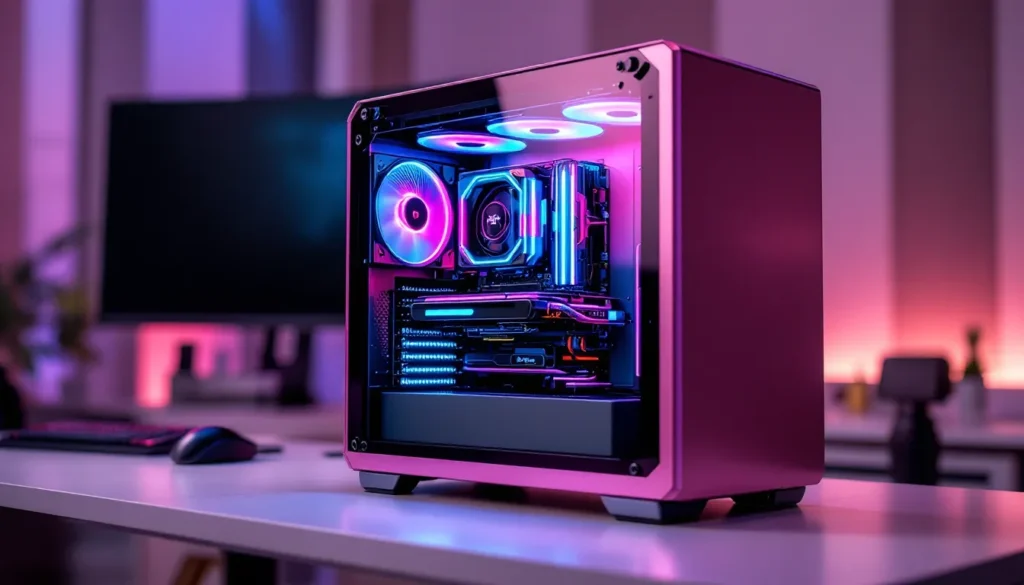
Pink gaming PCs have shifted from novelty builds to genuinely serious contenders in the prebuilt market. Whether you’re drawn to the aesthetic, want to stand out from the standard black-and-RGB crowd, or simply prefer pink’s growing availability in high-end components, finding the right prebuilt pink gaming PC means balancing style with raw performance. This guide breaks down everything you need to know about selecting, buying, and optimizing a prebuilt pink gaming PC that actually delivers competitive frame rates and reliability without requiring you to build it yourself.
Key Takeaways
- Prebuilt pink gaming PCs eliminate the hassle of sourcing matching pink components across multiple vendors while providing warranty coverage and technical support, making them ideal for gamers prioritizing aesthetics alongside performance.
- GPU performance is the primary driver of gaming capability—pair an RTX 4070 Super with an appropriate CPU like an i7-13700K for stable 1440p gaming at 100+ FPS, and step up to RTX 4080 or RTX 4090 for 4K performance.
- Mid-range prebuilt pink gaming PCs in the $1,500–$2,200 price range offer the best value-to-performance ratio, delivering serious gaming performance with 32GB DDR5 RAM, quality cooling, and legitimate warranty support from reputable manufacturers like Skytech and NZXT.
- Quality prebuilt builds prioritize GPU, CPU, cooling, and case design over color—a pink case with a weak RTX 4060 will underperform, while a functional RTX 4070 build delivers both performance and style.
- Verify warranty coverage, check independent reviews of the exact model you’re considering, and stress-test your prebuilt immediately after delivery to catch hardware defects early—reputable brands rarely have out-of-box issues.
- Prebuilts cost 10–15% more per dollar of specs than custom builds, but they save you weeks of assembly time, eliminate compatibility risks, and ensure color-matched components actually work together.
Why Choose a Prebuilt Pink Gaming PC?
Buying prebuilt saves you the headache of component compatibility, assembly, and the hidden labor costs of figuring out what actually works together. For pink builds specifically, prebuilts eliminate the hunt for matching pink components scattered across different retailers, someone’s already done that legwork.
The pink aesthetic has legitimacy now. Manufacturers recognize demand, so you’re not paying a premium tax for niche colors anymore. Brands like NZXT, ABS, and Skytech have integrated pink cases, RGB lighting, and cable management into their factory builds, meaning you get quality control without the DIY risk.
Prebuilts also come with warranty coverage, technical support, and often pre-optimized drivers. If something breaks, you call the vendor, not debug the problem yourself. For casual and mid-tier gamers, that peace of mind is worth it. For competitive players worried about reliability during ranked sessions, prebuilts from established brands reduce downtime significantly.
Key Specifications to Look For
GPU Performance
Your graphics card is the primary determinant of gaming performance. At 1440p (the current sweet spot for balanced frame rates and resolution), you’re looking at an RTX 4070 Super or RTX 4070 Ti minimum for stable 100+ FPS in AAA titles at high settings. For 4K gaming or competitive esports at 360+ FPS, step up to RTX 4080 or RTX 4090. AMD’s RX 7800 XT is also viable at 1440p for $100-$150 less than equivalent NVIDIA cards, though driver stability varies by title.
Check the VRAM: 12GB (4070 Super) handles most current games, but 16GB or 24GB future-proofs you better, especially for texture-heavy titles or professional work. Look at actual TDP and power consumption too, a 320W GPU needs proper case airflow and PSU headroom.
CPU and RAM Requirements
CPU pairing matters. An RTX 4070 needs at least an Intel i7-13700K or AMD Ryzen 7 7700X to avoid bottleneck. If the prebuilt pairs a high-end GPU with an older i5 or budget Ryzen, that’s a red flag. Current-gen or last-gen processors perform better and maintain future compatibility.
RAM: 32GB is now the baseline for gaming and streaming simultaneously. Single-channel 32GB is cheaper but slower than 2x16GB dual-channel, confirm the kit’s configuration. Speed matters too: 6000MHz CAS 30 DDR5 outperforms older DDR4, but the performance gap in pure gaming is smaller than marketing suggests. Prioritize capacity and dual-channel over peak speed.
Storage and Cooling Solutions
SSD speed has plateaued for gaming purposes, a PCIe 4.0 1TB drive loads games faster than SATA, but the difference is seconds, not minutes. Prioritize capacity: 1TB fills up quickly with modern AAA titles. Look for prebuilts offering 1TB NVMe + 2TB HDD, or better yet, dual NVMe slots for expansion.
Cooling directly impacts sustained performance. Air cooling with a high-quality 240mm or 280mm AIO keeps most systems stable. Poor case airflow or cheap 92mm fans cause thermal throttling under load. Check if the prebuilt specifies fan count, CFM ratings, and case ventilation design. Prebuilts from reputable manufacturers usually handle this well, but budget models sometimes skimp here.
Top Prebuilt Pink Gaming PC Models
Budget-Friendly Options
Pink prebuilts in the $800–$1,200 range typically pack an RTX 4060 Ti or RX 6700 XT, paired with an i5-13600K or Ryzen 5 7600X. These handle 1080p gaming comfortably at high-to-ultra settings, achieving 100+ FPS in competitive titles like Valorant, Fortnite, and Apex Legends. Streaming and light content creation is viable but requires CPU optimization.
Brand examples in this tier include basic builds from ABS and NZXT’s entry-level pink cases. You’ll see 16GB RAM and 512GB SSD, upgrading to 32GB and adding a second drive should be your first modification.
Mid-Range Powerhouses
The $1,500–$2,200 sweet spot delivers serious gaming performance. RTX 4070 or RTX 4070 Super setups paired with i7-13700 or Ryzen 7 7700X dominate 1440p gaming at 100+ FPS. These builds come standard with 32GB DDR5 RAM, 1TB NVMe, and legitimate cooling (240mm AIO or quality air setup).
Manufacturers like Skytech and NZXT shine here, offering polished cases, solid cable management, and RGB lighting that doesn’t feel cheap. Warranty support is typically 1–2 years. At this price point, you’re paying for convenience and assembly quality that justifies skipping custom builds.
High-End Performance Builds
Stepping into $2,500–$4,000+ territory means RTX 4080, RTX 4090, or flagship AMD cards. These crush 4K gaming, handle professional workloads, and future-proof you for 5+ years. CPU pairings include i9-13900K/KS or Ryzen 9 7950X, with 64GB DDR5 RAM becoming standard. Storage includes NVMe RAID setups or dual 2TB drives.
At these prices, builders invest in premium cases, custom cable sleeves, and enthusiast-level RGB control. Some offer liquid cooling loops. These builds target streamers, content creators, and competitive players chasing the highest frame rates. Support tends to be more personalized, with some builders offering tweaking and optimization services post-delivery.
Design and Aesthetics Considerations
RGB Lighting and Customization
RGB is a differentiator for pink builds. A sleek pink case loses impact if the internals are dark and invisible. Quality prebuilts include tempered glass side panels showing off the pink frame, RGB-lit fans, and addressable LED strips. Verify that RGB is controllable via software, cheap prebuilts sometimes hardwire colors to a single option.
Look for motherboards with RGB headers and cases with pre-installed lighting. ASUS and MSI boards offer robust RGB control via their utilities. If the prebuilt uses proprietary RGB software (common with ABS and NZXT), ensure it’s intuitive and compatible with your OS. Some builders allow you to swap RGB profiles for free within a warranty period.
Case Quality and Build Materials
A pink case should be more than just painted plastic. Quality prebuilts use aluminum frames, steel chassis, and tempered glass panels. Cheap cases develop creaks, vibrate under fan load, and offer poor thermals. Verify the case’s air intake and exhaust layout, bottom intakes with rear/top exhaust is the standard for decent airflow.
Build materials determine longevity. Mid-to-high-end prebuilts offer brushed aluminum finishes and cable routing channels that hide wires effectively. Budget cases cut corners with thin metal and plastic fans. Handling and durability vary significantly. If the prebuilt you’re eyeing uses a case model, look up reviews, case quality often determines whether a build lasts five years or becomes problematic within two.
Where to Buy and Warranty Information
Retailers matter. Major outlets like Newegg, Amazon, and Best Buy stock prebuilts from established brands, which means easier returns and consistent warranty enforcement. Smaller retailers sometimes offer custom-configurable builds, letting you swap components (though this voids some prebuilt discounts).
Brand-direct purchases from Skytech, NZXT, or ABS often provide better pricing and configuration options. Their websites typically let you customize GPU, CPU, and storage before assembly. Delivery times vary: direct orders might take 2–3 weeks during peak season, while Amazon fulfillment is faster but sometimes pricier.
Warranty coverage is critical. Standard prebuilt warranties are 1 year parts and labor: premium builds extend to 2–3 years. Check what’s actually covered, some warranties exclude cosmetic damage, overclocking, and liquid cooling issues. Restocking fees apply if you return an opened unit within 30 days. Read the fine print before purchasing.
You can also explore Walmart Gaming PC: Affordable, Reliable, and Future-Ready Options for budget alternatives, or investigate Unleashing the Power of for performance-oriented builds.
Prebuilt vs. Custom-Built: What’s Right for You?
Building your own PC is cheaper, you avoid assembly labor and retailer markups. But, you’re assuming risk: compatibility errors, DOA components, and the time investment (10–20 hours for most builders). Prebuilts cost 10–15% more per dollar of specs, but you get working hardware, warranty coverage, and someone else handles assembly errors.
For pink aesthetics specifically, prebuilts win. Building a pink system requires sourcing matching components across multiple vendors, a pink case alone, plus compatible pink RAM, cooler shrouds, and cable sleeves takes research. Prebuilts handle this integration for you, ensuring colors actually match and components fit together.
Timeline matters too. Custom builds take weeks between ordering and assembly. Prebuilts ship within days from major retailers. If you’re gaming this weekend, prebuilt is the only realistic option.
Competitive players benefit from prebuilt reliability. A dead component in a custom build means troubleshooting: in a prebuilt under warranty, it means a return label and replacement. Zero downtime is worth the cost premium if you’re grinding ranked or streaming.
Consider also resources like Jump into the Ultimate for brand-specific expertise, or Unveiling Dell Gaming Pc: Performance, Customization & Reliability Explained for enterprise-grade alternatives.
Performance Testing and Real-World Gaming Results
A prebuilt pink gaming PC’s specs matter, but real-world testing proves capability. Review sources like Tom’s Hardware provide comprehensive GPU and CPU benchmarks that apply directly to prebuilt components. Look for third-party testing of the exact GPU and CPU pairing, not every combination performs identically, especially under thermal load.
For 1440p gaming, expect these frame rates on a mid-range RTX 4070 build at high-to-ultra settings:
- Cyberpunk 2077: 70–85 FPS (DLSS Quality)
- Baldur’s Gate 3: 65–80 FPS (Ultra)
- Starfield: 80–100 FPS (High)
- Call of Duty: Modern Warfare III: 130–160 FPS (Ultra)
Competitive titles (Valorant, CS:GO) exceed 240 FPS easily on any modern GPU. High-end RTX 4080 builds approach 4K gaming viability, achieving 60–80 FPS in demanding AAA titles at ultra settings, though usually requiring DLSS 3 with frame generation.
Testing also reveals thermal performance. A well-built prebuilt maintains GPU temps under 75°C and CPU temps under 85°C during sustained gaming. If manufacturer-published temps exceed this, airflow or cooler quality is questionable.
TechRadar and PC Gamer regularly test prebuilt systems, ranking them by real gaming performance. Cross-reference your target build against their reviews, if the exact model has been tested, you’ve got concrete data. If not, look at comparable components and case designs to extrapolate performance.
Stability matters as much as raw FPS. Run games for 60+ minutes to ensure no throttling or crashes. Prebuilts from reputable brands rarely crash out-of-box, but thermal issues under sustained load aren’t uncommon in cheaper builds. Stress-testing with tools like 3DMark or Furmark for 30 minutes post-delivery reveals instability early, giving you time to RMA if needed.
You might also examine Ultimate Guide to Mini or Ultimate Guide to Mini for niche form factors and their performance trade-offs.
Conclusion
A prebuilt pink gaming PC is a legitimate choice if you prioritize convenience, warranty coverage, and aesthetic consistency. The color doesn’t compromise performance, what matters is the GPU, CPU, cooling, and case design underneath.
Focus on specs first, aesthetics second. A gorgeous pink case with a weak RTX 4060 will disappoint. A functional RTX 4070 build in the perfect pink case delivers both performance and style.
Budget matters, but it’s not the whole story. Mid-range prebuilts ($1,500–$2,200) offer the best value-to-performance ratio, hitting 1440p targets without unnecessary overhead. Budget builds work for casual play and esports. High-end builds justify their cost only if you’re pushing 4K, streaming, or creating content simultaneously.
Before purchasing, verify specs, check warranty terms, and read independent reviews of the exact model. Buy from retailers with reliable return policies. Once delivered, run stress tests immediately to catch dead-on-arrival hardware early.
The prebuilt pink gaming PC market is genuinely competitive now. Quality options exist at every price point, and manufacturers have figured out that pink enthusiasts want real performance, not sacrificed components for aesthetics. Choose based on your gaming goals, budget, and case design you’ll actually enjoy staring at every day.